CIS 254 Intro to Object Oriented Program Design
Project 7.3
Write a program that prints out the number of words in textfiles. We will define a word to be any sequence of non-whitespace characters. So "hi&there...mom" would be considered a single word. Solve this problem by reading each word into a string variable.
Your program should ask the user for the name of the file to count words in, and then print the number of words in the file on the screen. It should continue to do this until the user types "quit" for the name of the file.
You will make your life much easier if you do not use any variables of type char in this assignment. Use variables of type string instead.
If the user enters an invalid file name, the program must print "Couldn't open file." and then proceed to prompt for another filename.
Here are some sample input files. (You can also download these files from zyBooks): file 1 | file 2 | file 3 | file 4 | file 5
Here is a sample run:
Enter the filename: p7.3-data1.txt
The file has 7 words.
Enter the filename: hello
Couldn't open file.
Enter the filename: p7.3-data2.txt
The file has 10 words.
Enter the filename: quit
Hints about reading input files:
Using JDoodle:
Input files can be uploaded to JDoodle by selecting the "Upload input files" icon that is located near the top in the right side of the project window. This will open the Upload input files window and you can either browse and select the file from your computer or drag and drop the file.
When the program is executed and asks for the name of the input file, the entire file-path and extension for the file must be entered. For example: /uploads/filename.txt
Using Visual Studio:
- right-click on the "Source Files" folder in the Solution Explorer and choose "Add" then "New Item".
- Then in the "Add New Item" window, navigate to "Utility" and select "Text File (.txt)". This adds a text file to the "Source Files" folder in the Solution Explorer.
- copy the data from the webpage where it is provided and paste it into this file.
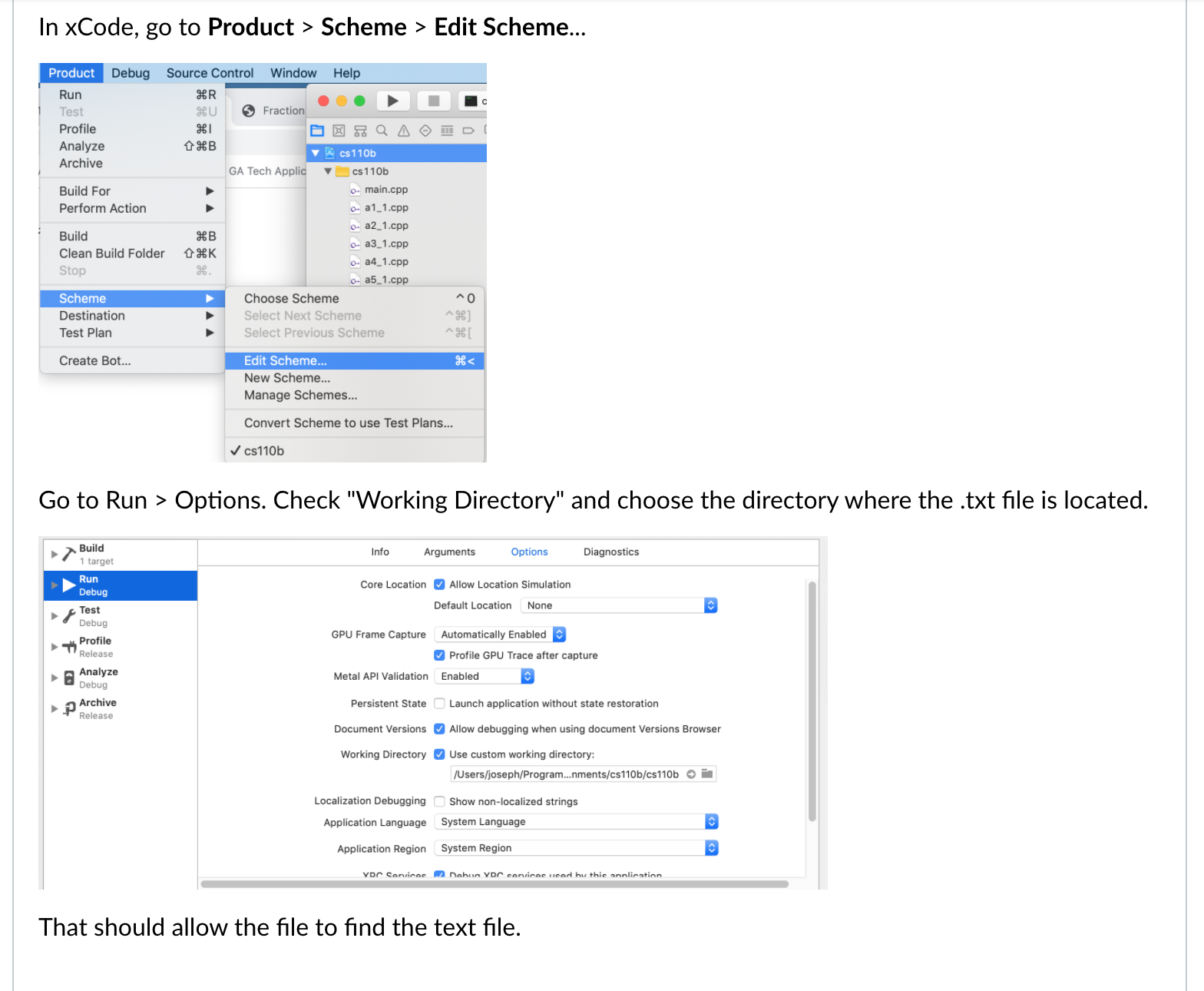
Using Xcode:
About File Names
Extensions are part of the file name. If you want to count the words in a file named "myfile.txt", typing "myfile" or "myfile.cpp" won't work.
On many systems, the default is to not show the extension on file names. I strongly suggest that you change this setting, so that extensions are shown.