CIS 254 Intro to Object Oriented Program Design
Project 10.1
This assignment is a continuation of the last assignment. I'll repeat the introductory information (including the structure diagram) here, and then dive right into phase 4.
The purpose of this assignment is to give you lots of practice with parameter passing without making you write a huge program. For this reason you must adhere to the following structure diagram. If you fail to do this, you will receive a 0 on the assignment. Each box represents a function that you will have in your program. It includes every function that you will have in your program. You should have no more and no fewer, and you should use the exact names that have been indicated here. The functions won't make sense just yet. You'll need continually refer back to this diagram as you work your way through the phases.
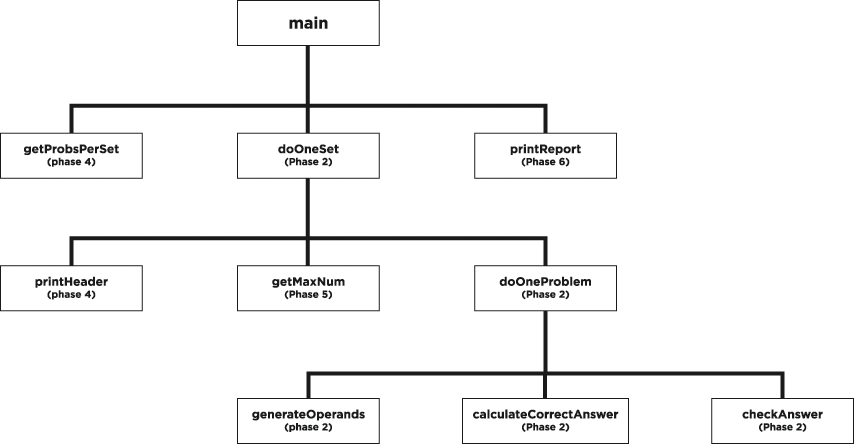
Structure Diagram Notes:
- The doOneProblem function does exactly one problem, not one *type* of problem! This function will perform all of the tasks involved in finishing one complete problem, including printing the problem, checking the answer, etc.
- CheckAnswer is the function that writes either "correct" or "incorrect"
- You will receive a 0 on this assignment if you use global variables, arrays or structs
- You will lose points if the code you put in one of your functions does not correspond to the name of the function given in the structure diagram.
- Do not use value returning functions in this assignment. The purpose of this assignment is to give you practice with parameter passing, including pass-by-reference, and you could miss much of this experience if you use value returning functions instead.
Phase 4: Now you are ready to let the user specify how many problems per set. (Recall that a set is a group of problems all of the same type. In this program we are doing three sets: one set of addition, one set of subtraction, and one set of multiplication. This means that, for example, if the problems per set is 7, there will be a total of 21 problems given.) Ask the user to enter the number of problems per set at the very beginning of the program, so that all three sets have the same number of problems per set. Now your main() function will look exactly like this except that you may add variable declarations in the indicated location:
    int main()
    {
        <you may add variable declarations here>

        srand(static_cast<unsigned>(time(nullptr)));  // comment this out to submit to zyBooks
        getProbsPerSet(probsPerSet);
        doOneSet('+', probsPerSet);
        doOneSet('-', probsPerSet);
        doOneSet('*', probsPerSet);
    }
For this phase you should also add a header at the beginning of each set, as illustrated in the following sample output for this phase. For purposes of the header, you should assume that the addition problems will always be set #1, the subtraction problems set #2, and the multiplication problems set #3.
    Enter problems per set: 3
    Set #1
    ----------
    45 + 21 = 66
    correct
    0 + 100 = 100
    correct
    54 + 23 = 67
    incorrect

    Set #2
    ----------
    59 - 19 = 40
    correct
    19 - 84 = -29
    incorrect
    0 - 65 = -65
    correct

    Set #3
    ----------
    0 * 87 = 0
    correct
    45 * 84 = 398
    incorrect
    8 * 37 = 873
    incorrect
Phase 5: Now let the user specify maxNum, the maximum number to be used for each set. This means that instead of choosing numbers between 0 and 100 (inclusive) for each problem, the computer will be choosing numbers between 0 and maxNum (inclusive). You must allow the user to enter a different maximum number for each set. This won't change the main() function, since you need to ask it again before each set. It will be done near the beginning of your doOneSet() function. Here's the sample screen output:
    Enter problems per set: 3

    Set #1
    ----------
    What is the maximum number for this set? 100
    45 + 21 = 66
    correct
    0 + 100 = 100
    correct
    54 + 23 = 67
    incorrect

    Set #2
    ----------
    What is the maximum number for this set? 90
    59 - 19 = 40
    correct
    19 - 84 = -29
    incorrect
    0 - 65 = -65
    correct

    Set #3
    ----------
    What is the maximum number for this set? 20
    0 * 18 = 0
    correct
    15 * 4 = 398
    incorrect
    8 * 17 = 873
    incorrect
Phase 6: Now you need to keep track of how the user is doing. after the user has attempted all of the problems, your program should write a report that says how many the user got right on each set out of how many and for what percent. The report must also indicate the overall figures. Here's a sample screen output:
    Enter problems per set: 3

    Set #1
    ----------
    What is the maximum number for this set? 100
    45 + 21 = 66
    correct
    0 + 100 = 100
    correct
    54 + 23 = 67
    incorrect

    Set #2
    ----------
    What is the maximum number for this set? 90
    59 - 19 = 40
    correct
    19 - 84 = -29
    incorrect
    0 - 65 = -65
    correct

    Set #3
    ----------
    What is the maximum number for this set? 20
    0 * 18 = 0
    correct
    15 * 4 = 398
    incorrect
    8 * 17 = 873
    incorrect

    Set#1:  You got 2 correct out of 3 for 66.7%
    Set#2:  You got 2 correct out of 3 for 66.7%
    Set#3:  You got 1 correct out of 3 for 33.3%
    Overall you got 5 correct out of 9 for 55.6%
Note that the results must be rounded to the nearest tenth. To round your results, just use
cout << fixed << setprecision(1) << yourPercentCorrectVariable;
You'll also need to #include <iomanip>
Technical note: some of you may notice that this technique does not always round up on "5" as we are all taught to do in math. Don't worry about this. You can assume that the rounding that this technique does is correct.
Your main() function for phase 6 must look like this, except that you may add variable declarations and arguments in the indicated locations:
    int main()
    {
        <variable declarations>

        srand(static_cast<unsigned>(time(nullptr)));   // comment this out to submit to zyBooks
        getProbsPerSet(<arguments>);
        doOneSet(<no-more-than-3-arguments>);
        doOneSet(<no-more-than-3-arguments>);
        doOneSet(<no-more-than-3-arguments>);
        printReport(<arguments>);
    }
Since printReport() will be almost all cout statements, we will make an exception to the Style Convention about functions never being longer than 15 lines. But it should still come in under 20.
Notice that you may send no more than 3 arguments to doOneSet. Hint: Although main() will need three separate variables to keep track of the number of problems answered correctly in each set, your doOneSet function will have only one parameter that keeps track of the number of problems answered correctly in the current set. It will be up to main() to get that information into the correct variable.
More hints: Many students struggle with phase 6, so in case you get stuck, here are my suggestions for how to approach this:
- Start by writing the printReport() function. That way you will know exactly what parameters printReport() will need in order to do its job.
- Then work your way backward.
- In main(), in the call to printReport(), add the appropriate arguments to match printReport()'s parameters that you just determined.
- Then figure out how main() will get those values. (The only way main can get those values is to get them from doOneSet().)
- So, you'll have to edit doOneSet() so that it communicates the correct value back to main(). How will doOneSet() know what the correct value is? This will involve some work inside doOneSet(), but mostly it means that doOneSet() will need to get some information from doOneProblem().
- And keep going, working your way backward.
Important Submission Note: Before you submit your code to zyBooks, comment out the srand() statement. This will ensure that you get the numbers for the problems that zyBooks is expecting.